
Navigating the ICP Course
Content Screen Navigation
ICP course content screens contain 3 types of instructional presentation that require navigation:
1. Video clips: Start any video clip by selecting the arrow in the center of a video clip window
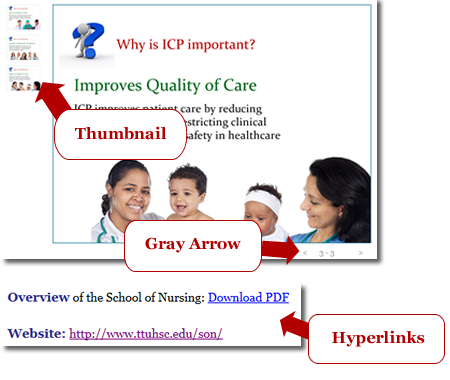
2. Slide carousels: You can navigate through a slide carousel in a linear or non-linear manner.
- Linear navigation: Select a small gray arrow (lower right corner of slide) to navigate forward or backward one slide at a time.
- Nonlinear navigation: Select any slide thumbnail (upper left or top portion of slide) to view a larger image of a slide.
3. Hyperlinks: Simply select any hyperlink to view the linked content (e.g., website, PDF file).


Get started with Module 1 by clicking the green arrow to the right
Copyright © TTUHSC. All rights reserved
Developed by Drs. Jongpil Cheon and Steven Crooks